A structured Pinterest content calendar template provides the foundation for consistent, scalable visual search marketing. Rather than deciding what to pin on the fly, a structured calendar maps keywords, target boards, creative angles, and planned manual posting dates across the entire month.
Use this framework alongside ClickToPin's interactive Planner to streamline your editorial pipeline from research in Pinterest Keyword Research Tool to finished Pinterest Pin Copy.
Free downloadable spreadsheet resource
Download the 30-Day Pinterest Content Calendar Template (.CSV)
A ready-to-import spreadsheet with columns for scheduled publish dates, destination URLs, target boards, primary keywords, 5-angle creative types, and mobile overlay safe-zones.
Download CSV TemplateCore elements of a high-converting Pinterest calendar
| Calendar Field | Description | Best Practice |
|---|---|---|
| Planned Date & Time | Scheduled manual posting slot | Space angles 2-3 days apart across peak traffic hours (evening/weekend) |
| Destination URL | Target article or product page | Ensure fast mobile loading, clear answers, and 2:3 Pin dimensions |
| Primary Keyword | Target search query | Include in title, description, overlay, and alt text |
| Pin Creative Angle | 1 of 5 psychological triggers | Rotate between SEO, Benefit, Audience, Sensory, and Method |
| Target Board | Specific niche Pinterest board | Pin to the most specific board first, broader boards later |
| Status Pipeline | Lifecycle stage | Track progress: Idea ➔ Draft ➔ Ready ➔ Posted |
30-Day Multi-Angle Distribution Matrix
Publishing 5 distinct Pin angles for a single article over 30 days keeps your content ranking organically without triggering spam filters:
| Angle # | Angle Name | Release Day | Board Selection | Creative Focus |
|---|---|---|---|---|
| Angle 1 | Direct SEO Match | Day 1 | Primary Niche Board | Exact-match keyword title + clear text overlay |
| Angle 2 | Benefit & Outcome | Day 4 | Secondary Topic Board | Highlighted end result, transformation, or time savings |
| Angle 3 | Curiosity & Hook | Day 8 | Audience-Specific Board | "Stop making this mistake" or "The secret trick to..." |
| Angle 4 | Sensory & Visual | Day 14 | Inspiration & Ideas Board | High-contrast aesthetic imagery + minimalist copy |
| Angle 5 | Method & Quick Hack | Day 21 | Tips & Tutorials Board | Numbered step-by-step or beginner shortcut framing |
How to organize your monthly Pinterest schedule
[WEEK 1: KEYWORD RESEARCH] ➔ [WEEK 2: ASSET GENERATION] ➔ [WEEKS 3-4: PACED MANUAL POSTING]
1. Group content by topic clusters
Organize your monthly content into 3 to 4 core thematic clusters. For example, a food blogger might dedicate week 1 to Easy Weeknight Dinners, week 2 to Air Fryer Recipes, and week 3 to Meal Prep Breakfasts. Pair this with our Pinterest SEO Checklist to verify your profile and board health.
2. Schedule 5 Pin angles per topic
For each article in a cluster, generate 5 distinct Pin variations using Pinterest Pin Generator formatted to standard 1000 × 1500 px Pinterest Pin size. Spread their publication dates across the month so your profile maintains a steady stream of fresh creative assets.

3. Track execution in ClickToPin Planner
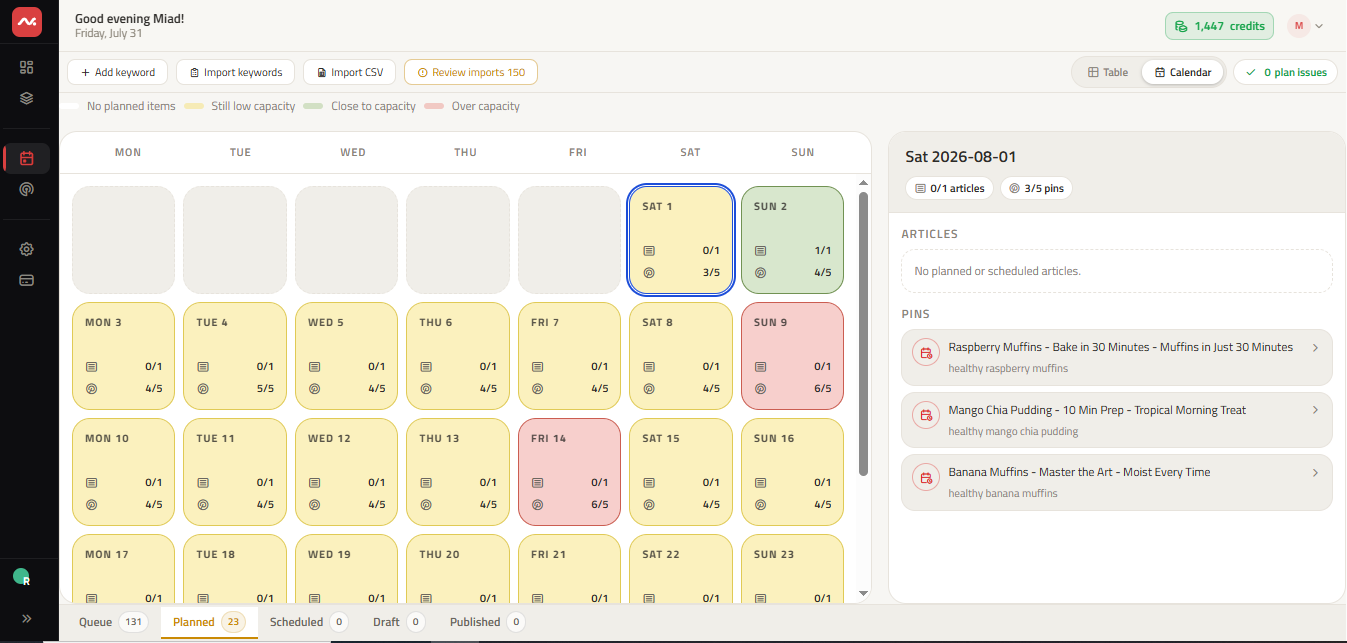
Import your editorial calendar directly into ClickToPin Planner to manage both Table and Calendar grid views with one-click status transitions.
Frequently asked questions
What is the best posting cadence for Pinterest?
Publishing 3 to 8 high-quality fresh Pins per day across relevant boards provides steady growth without overwhelming your audience or triggering spam flags.
Should I pin the same image to multiple boards?
No. Pinterest prioritizes fresh images. Create distinct visual variations and angles for each board rather than re-pinning identical image files repeatedly.
How does a content calendar prevent Pinterest spam penalties?
Automated bulk posting that blasts 20 identical pins in seconds is flagged by Pinterest's anti-spam heuristics. A paced content calendar schedules spaced manual posting, ensuring each Pin has a unique title, fresh visual, and relevant board assignment.